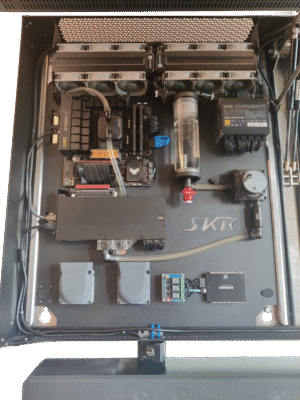
HOME MEDIA CENTER

The issue

Having to relocate can be challenging.
Digitalization (documents, photos, …) can be quite helpful in reducing this burden.
Digitalization of personal and professional documentation increases the need of data security, backups and redundancies.
This adds to the already-growing amount of home electronics that have to be placed, interconnected and transported.
Aside from professional needs, comforts such as a sound system and a decent TV are quite common.

Wiring creates additional clutter besides the already invasive amount of home electronics.


Typical home electronics include:

  • Internet Router
  • PC
  • PC screen
  • TV
  • Storage Server (NAS)
  • Calendar Server
  • Webserver
  • Data Backup
  • Sound system
  • Gaming console
  • Conference call equipment
  • Wiring (electrical & data)

Initial concept

  • low footprint, best utilizing unused space
  • stealthy, reduce clutter
  • transportable
  • extremely rigid for transport
  • ease of accesibility and maintenance
  • upgradeability
 

Evolved concept

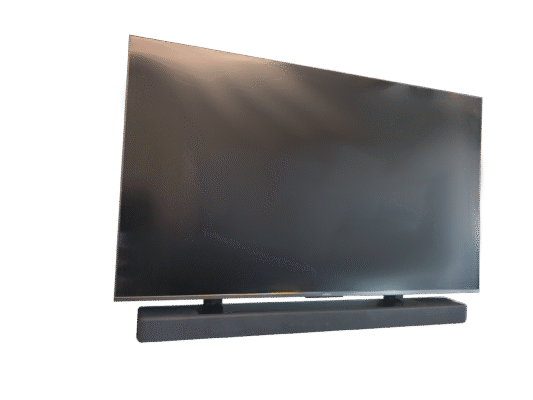
After careful consideration, a suitable concept was devised by creating a wall-mount frame that goes behind the TV and acts as a wall mount for everything. Due to the established perception of TVs in living rooms, it would be visually insignificant to add components to the unused space.
Using the TV as main PC screen reduced the amount of required electronics as well as dedicated workspace (remote access allows global deployment of computing power).
Furthermore, the screen could be used as part of the enclosure.
 
In order to take full advantage of the designated area and provide efficient cooling, all components would have to be laid out flat, which is somewhat unusual for some consumer electronics.
This evolution/revision of the concept increased its complexity.
 
  • TV holder functionality
  • TV holder mechanism must clear obstacles above, below and to the sides as well as internally to account for probable furniture
  • hide the screens backside/cables
  • low weight
  • efficient cooling
  • panel-style design
     

An initial proof of concept was created (practical considerations).
Core Components

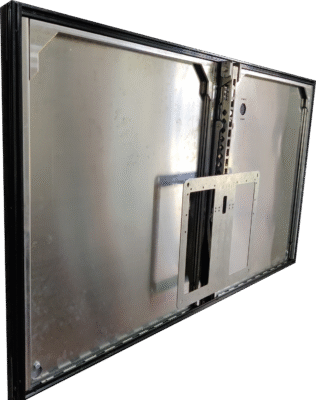
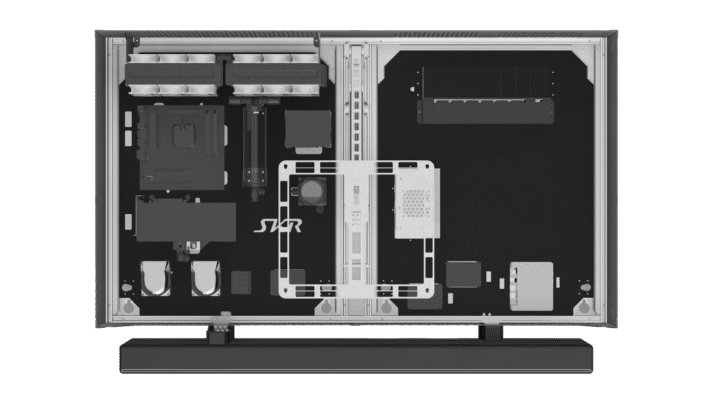
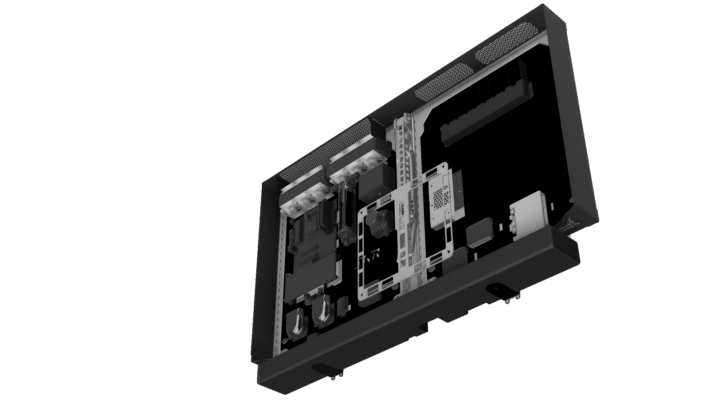
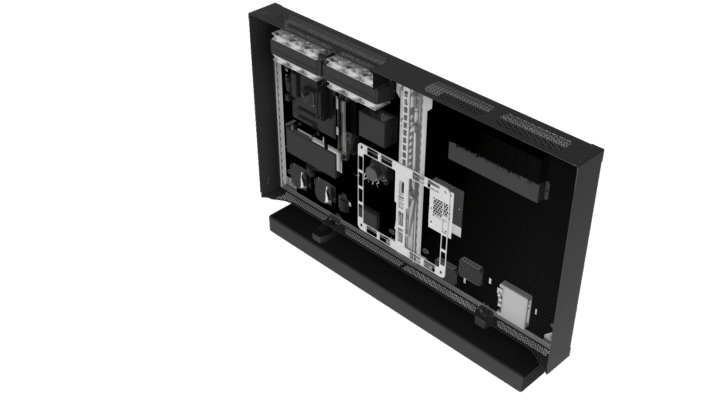
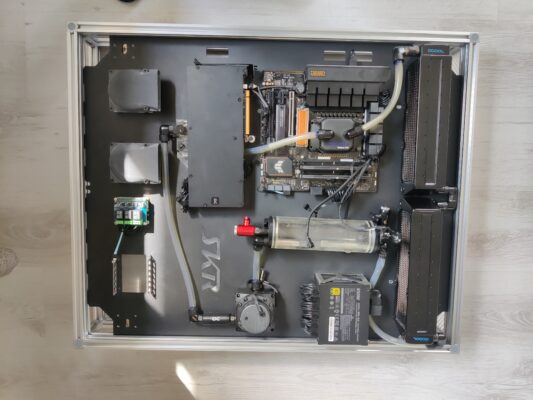
Closely following the screen dimensions, the rectangular frame is subdivided into two device mounting and one screen mechanism section.

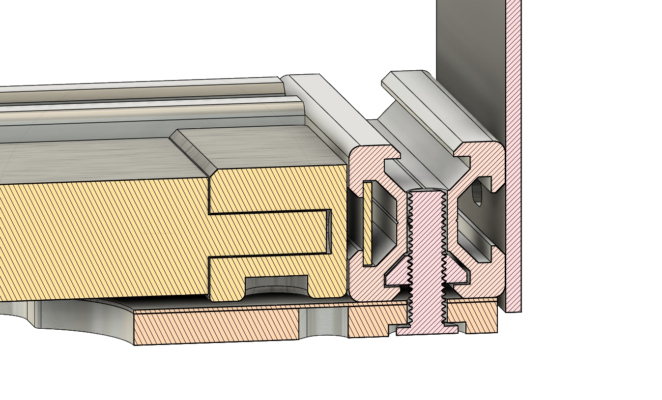
Universal aluminium extrusions, with grooves on all sides, provide the perfect cost-effective base.

At the back, a 0.5mm stainless steel sheet (with optional cable bulkhead) covers the entire frame with the corners and subdivision joints reinfored by aluminium plates which double as load bearing wall mount hardpoints (up to 8). In principle, this is comparable with a painting canvas where individual components support one another and form a rigid, weight distributing, shock absorbing whole.

The outside grooves hold the aluminium baffles that create a low-profile, aesthetically pleasing enclosure with the TV, being precisely matched to its rear outline and providing well-defined seating surfaces.

The inside grooves play a crucial role for various mechanisms explained below.

The front-facing grooves are utilized as versatile mounting point for accessories, cables and potential retainers of wiring tunnels.

A suitable TV mounting mechanism had to be both as compact as possible folded up and provide ample access to the inside assembly. Most linear movements were found to be unsuitable.
Motorization added very little benefit for its complexity and cost and was thus shelved.

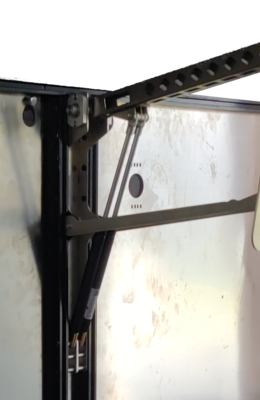
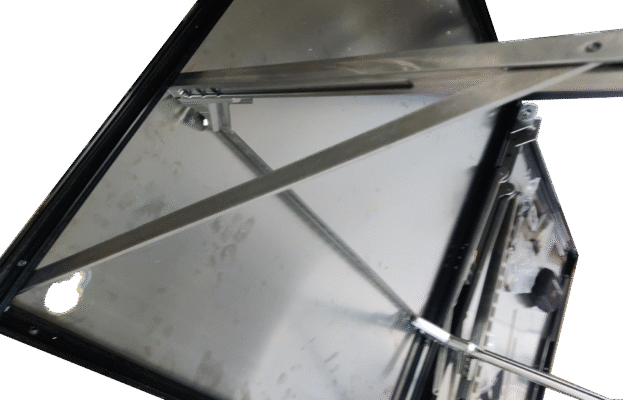
As a solution, the robust main arm carries the entire weight of the TV and doubles as cable management tunnel.

Supported by two auxiliary arms that ensure proper screen orientation, they are designed to provide a backstop in the closed position and relieve tension.
These auxiliary arms are designed to allow the TV to first tilt forward without lifting up, enabling quick and easy access to power distribution as well as supervision.

Hold-open as well as hold-close is achieved by a pair (for redundancy and space savings) of shock absorbers.

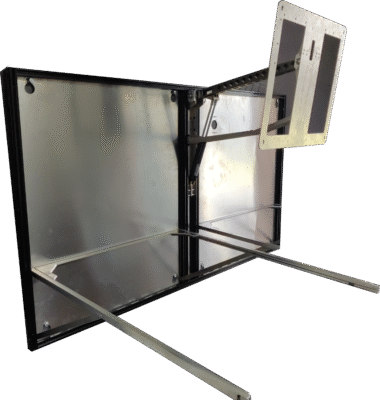
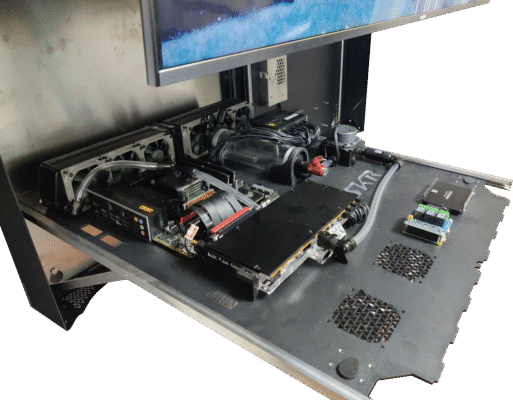
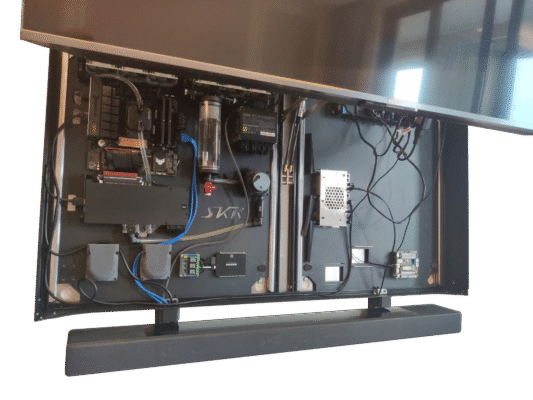
Deploying the mechanism tilts the TV forward at first, then arcing slowly up, clearing furniture before swinging mainly up. In this position, an ample access opening of about 0.5m is availble.

Designing the entire mechanism essentially as a self-contained module allows for the changing momentum and force exerted on the lever-like assembly to be self-contained.
Generous interlocks with the base frame spread the weight out over the base frame. This becomes especially crucial when the mechansim including screen is in the ‘open’ position.

Clever design reduces the amount of individual parts and allows for more economical production.


On the proof of concept, 5mm black plastic plates were simply slotted into the frame extrusions. individual components would be directly bolted on from the front or mounted using bulkhead-style screws, sometimes with mounting brackets.

Lessons learned led to the PC components being rotated by 180 degrees and a cooling circuit revision, allowing for the PC assembly to be fitted to one dedicated Mounting Plate.
Cable management, initially considered negligible, could be improved if the space behind the plates could be made accessible. This would also make a slight impact on cooling performance.

Significant upgrades and system rebuilds were found too awkward do on the proof-of-concept’s fixed-state vertical plates.
Transporting the entire assembly was supposed to be done with the TV removed, exposing the front face and enabling damage to highly sensitive electronics. 
While a full-size transport protection sheet was considered, a different solution got pursued.

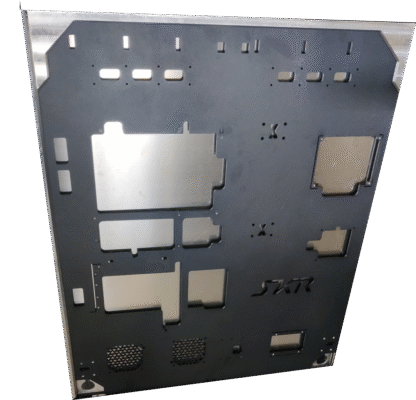
In the final version, the mounting plates would be made from aluminium in order to be incorporade into the cooling solution and provide the required rigidity to act as stand-alone modules.
A clear subdivision could and would be mad between the newly designated PC mounting plate – highly customized to the specific hardware – while the other one would be more universal, frequently modified, cut out or drilled as and when needed. 

In case the plates need to get completely removed, there is a simple frame, made from extrusions and acrylic. used together with the acrylic, it provides a sturdy Transport Case so the PC can be used stand-alone. Removing some of the acrylic and flipping over the mounting plate creates a test bench-like scenario.


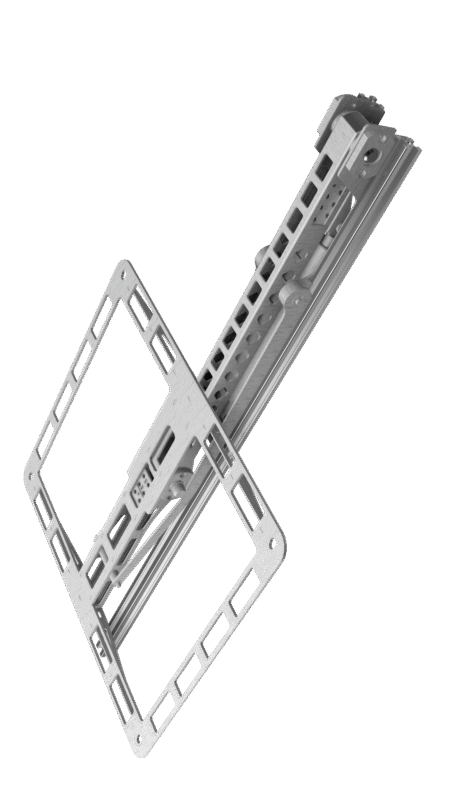
Introduced after the proof of concept, the mounting rails are a key point of the solution.

One imperative during the design phase was making all parts as low-profile and compact as possible.
In their vertical orientation, the Mounting Rails should be flush with the Base Frame.
Their operating mechanism should be as low profile as possible, flush with the aluminium extrusions yet robust enough to withstand frequent operation under full load. For this reason, the rails, joints and connective components were executed in stainless steel, including lightening cuts. 

When the screen is “up”, ~500cm of space is availabe.
Surrounding furniture may still limit accessibility significantly.
Also, attempts to install certain components this way proved challenging expecially when they had to be thermally coupled to the carrier plates.
Attempted removal of the – vertically oriented – mounting plates involved the possibility of gravity-induced, spontaneous and violent disassembly that had to be counteracted.

A mechanism guiding the mounting plates into a horizontal position, partially clearing the screen and thus making them easier and safer to remove, was required.

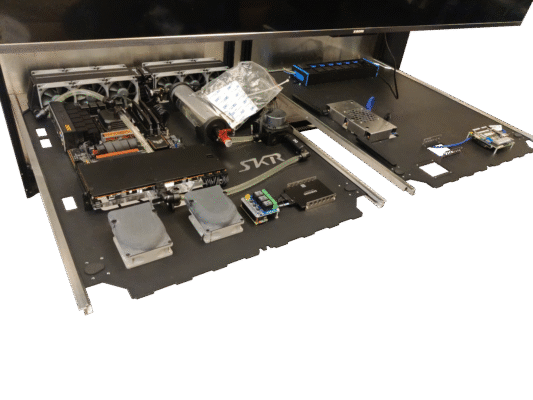
This was achieved by introducing a pair of rails, joined at the top for synchronous movement, that fit flush with the base frame. A clever sliding lever combination enables the rails to swivel forward while rotating in the same motion around the lower third of the mounting plate. Carefully designed details make sure the mechanism stops and remains stable by itself in the horizontal position and is pushed back up using simple motion.

Several locking mechanisms were incorporated:

Each mounting plate is retained inside the mounting rails by two sprung travel lock locks. During plate insertion, these self-engage and can only be released two-handedly. Their positioning at the point of mechanism operation ensures that the user’s hands are exactly where they need to be once the plate gets manually unlocked.

Alternate mechanisms, joining the mounting rails at the bottom, are possible.

At vertical, the solution simply relies on gravity and the grooves in the aluminium extrusions for locking. Exploiting the aluminium extrusions’ design reduces compexity while ensuring maximum security.

Safeties against permitting the TV mount down while the mounting rails are in the horizontal position were considered but found to be unnecessary.


Providing a stable horizontal position has many practical benefits:

  • Improved upgrade and maintenance capability
  • Greater cable management opportunity
  • System troubleshooting 
  • Improved coolant loop venting

With this last component, a truly universal and modular solution has been achieved.

Currently the Home Media Center features two external attachments.

A soundbar, mounted to the base frame via a pair of brackets.

The necessary, minimal I/O is hidden inside the covers of these brackets. In the prototype, this featured dual USB and one HDMI while the latter was omitted in the final version.

Further attachment points, i.e. for cameras and microphones, are possible and would be mounted in that same gap.

The gap itself is necessary for air intake.

The Solution

By design, the Home Media Center doesn’t catch the eye.
Barely 15mm further off the wall than a comparable, dedicated wall-mount.
20mm closer to the wall than the TV’s original stand would allow it to be.

Due to the high-quality frame fitment and finish, it won’t be noticed at all.

The – extremely few external cables required can be led stealthily along either the soundbar brackets or, ideally, out the base frame’s back and through a wall-embedded cable canal for maximum effect.

Using integrated relays and smarthome technology, all that’s needed to access 99% of functions is a phone. Zero external buttons or classic remotes. It doesn’t get cleaner.

Its mounting off the floor doesn’t only mean it’s safe from accidentally toppling over, it also significantly reduces the amount of dust taken in by the actively cooled components, thus reducing the need for maintenance.

The weight is also most optimally arranged:
While the overall assembly weights a fair bit, most of that weight is mere millimeters off the wall – minimizing the force thus exerted on the wall anchors.
The screen lifting mechanism is very easy and reliabe to use. It grants easy and ample access for any but the most extensive upgrades.

Using the Mounting Plate mechanism is fairly intuive, robust and reliable. The Horizontal position is great for double checking the wiring and cable managing before everything’s ready.
It’s also very comfortable to do most installation, even drilling of new mounts, in this position.

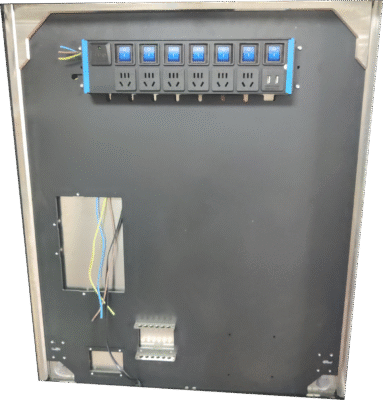
On the right, more universal plate, however, many changes have been made: The old WiFi Router has been dropped in favor of an ethernet switch, the NAS Mini PC replaced with a more powerful model.

Later additions to this are an integrated virtual router and smarthome server.

In order to supply the necessary power, a generous and surge-protected power bar is permanently installed. Below, necessary AD/DC converters or extra cable is cleanly hidden in a small, removable tray. During one upgrade, vent holes were laser cut into the area behind the tray to provide air circulation.

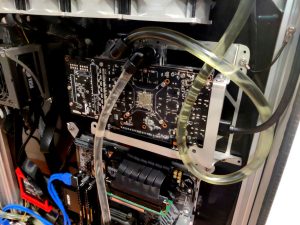
An initial small NAS was replaced by a new Mini PC. This received a custom designed, all-around cooler that’s thermally coupled to the Mounting Plate itself. Other than providing completely passive, silent operation, this was also done to further integrate the Mounting Plates into the cooling system.
During utilization, this one component has replaced NAS, Router, Smarthom-e, Calendar-, Cloud- and Web Server.

Cooling proves to be highly efficient.
The selected PC hardware is top-end at the time of purchase.
The main deciding factor for system thickness was cooling fan diameter:
80mm fans became the core of performance hardware cooling, influencing much of the design.
The aluminium extrusions’ thickness as well as Base Frame air outlets were designed to allow as much heat evacuation as possible.

Additional internal air baffles, under optional consideration during design, were deemed unnecessary.
By intentionally creating a narrow space along which the cooling fans are oriented, their air-moving capabilities are channeled to directly onto the primary heat sources, taking natural convection into account and using it to supplement the cooling effect.

Most cables can be guided through cutouts in the mounting plates and laid along the cavity in back with cable guides and retainers being a possible upgrade path. where diameters are too thick or angles too sharp, however, extrusion-mounted retainers or the extrusions themselves prove useful.
Wire canals, additions to the front grooves of the aluminium extrusions, were found to be unnecssary as well.

Transportability, as by design, has been successfully verified several times.
During domestic transport and intense international shipping, the designed-for means of transport have been exceeded.
During one international shipping process, it proved prudent to instead ship the PC Mounting Plate seperately in the Transport Case. Upon arrival, in both cases, there was no visible degradation or damage to the solution.
Reassembly was done and the Home Media Center – power rail, NAS, router, smart home, cloud sync, media PC, network switch, PC and control relay – deployed.

Within minutes.

Not only has the soluion proved its viability many times over, it also showcases how we tackle a complex, higly ambitious set of requirements and create something high quality and long-lasting that exceeds expectations.